Why can't my bot join a Zoom meeting?
Last updated: November 11, 2024
If you're having trouble getting your bot to join a Zoom meeting, it may be due to Zoom SDK app publishing restrictions. Here's what you need to know:
Check the bot's status changes
First, review the bot's status_changes. It's likely that it is one of the following sub codes:
zoom_sdk_app_not_publishedzoom_invalid_signature
The zoom_sdk_app_not_published sub code
This error means that the SDK credentials configured in your Recall dashboard have not been approved by Zoom. As a result, bots using unapproved Zoom credentials can only join meetings hosted in the workspace of the user that created the credentials.
How to resolve the issue
For testing: Ensure that the Zoom meeting you're trying to join is created from the same account that your Zoom app was created in. Double-check that you're signed into the proper account in your Zoom client if that's where you're creating these meetings.
For production use: To allow your bot to join calls outside of your Zoom workspace, you must submit your Zoom app for approval.
The zoom_invalid_signature sub code
This means one of two issues is occurring:
The meeting URL you've provided is invalid.
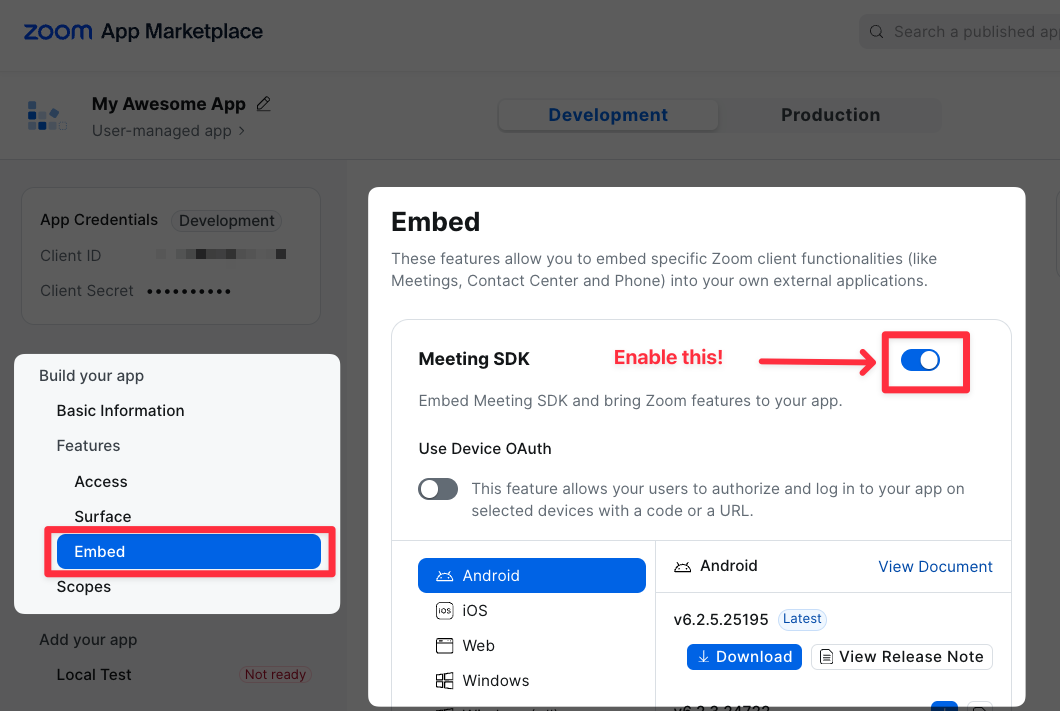
You have not enabled the meeting SDK on your Zoom app
How to resolve the issue
If you've double checked that the meeting URL is valid, then you should ensure that the meeting SDK is enabled on your Zoom app.
For more information on Zoom SDK app restrictions and error codes, refer to our documentation on sub-codes.